Mobile App Test Automation Guide

Here's a number that should grab your attention: nearly 88% of users say they’d abandon an app over bugs or glitches. And 78% notice issues in the apps they use. That’s a clear message—users won’t tolerate apps with bugs or glitches.
Mobile App Test Automation Essentials: Benefits, Tools & Best PracticesDirect link to Mobile App Test Automation Essentials: Benefits, Tools & Best Practices
Today’s mobile apps are packed with features, run on countless devices, and operate across unpredictable environments. Testing manually isn’t just inefficient—it’s impossible to scale.
That’s where mobile app test automation comes in. It helps teams catch bugs early, test smarter across platforms, and launch confidently without slowing down development cycles.
Let’s break down how automation makes all of that possible.
What Is Mobile App Test Automation?Direct link to What Is Mobile App Test Automation?
Mobile app test automation is the practice of using tools and scripts to automatically test your app without relying on manual input at every step.
Instead of testers repeating the same actions over and over, automation helps simulate those actions at speed and scale. It’s how teams catch bugs early, validate performance, and ensure a smooth user experience across devices, platforms, and updates.
In short, it’s the smarter, faster way to build confidence in your app before every release.
Key Building Blocks of Mobile App Test AutomationDirect link to Key Building Blocks of Mobile App Test Automation
Before you dive into automation, it’s important to understand the core components that make it all work:
-
Test Scripts: These are your instructions to the automation tool—step-by-step actions that mimic what a user would do. Think of them as the blueprint for your testing process.
-
Test Frameworks: A framework gives structure to your automation. It helps organize scripts, manage data, and make testing repeatable and scalable over time.
-
Automation Tools: Tools like Appium, Selenium, and TestComplete do the heavy lifting, executing your scripts across various devices, screen sizes, and operating systems, all without human intervention.
Intelligent tools like DevAssure's mobile app testing goes beyond just writing and executing scripts. The platform offers a purpose-built automation engine designed specifically for mobile apps across iOS and Android, real devices and emulators, native and hybrid apps.
To explore how it fits your workflow, book a personalized demo.
Types of Mobile Apps: How Automation Supports ThemDirect link to Types of Mobile Apps: How Automation Supports Them
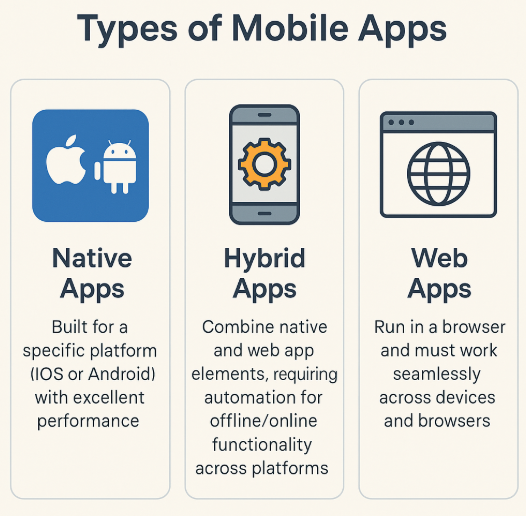
Mobile app test automation isn’t one-size-fits-all. Different app types bring different testing challenges and automation plays a role in handling each.
-
Native Apps: Built specifically for one platform (like iOS or Android), native apps offer top-tier performance. But testing across different OS versions can be tricky. Automation ensures your app behaves consistently across devices and updates.
-
Hybrid Apps: These apps are built with web technologies but installed like native apps. They work both online and offline, across platforms making automated testing essential for performance and compatibility.
-
Web Apps: Web apps run inside mobile browsers. They don’t need installation, but they must work seamlessly across browsers, screen sizes, and devices. Automated testing helps ensure reliability across every scenario especially when paired with effective cross-browser testing strategies.
Benefits of Mobile App Test AutomationDirect link to Benefits of Mobile App Test Automation
Automating your mobile app tests isn’t just about convenience it’s a strategic move that brings tangible results. Here’s how it pays off:
-
Speed Without Sacrificing Quality
Automated tests run in minutes, not hours. You get faster feedback, catch bugs earlier, and keep development moving all without slowing down release cycles. -
Broader Test Coverage
Run your tests across multiple devices, OS versions, screen sizes, and network conditions all in parallel. Automation helps you cover more ground without adding extra hours. Learn how to set up parallel test execution with DevAssure to save time and expand test coverage effortlessly. -
Lower Long-Term Costs
Yes, automation requires some setup. But it quickly pays for itself by cutting repetitive manual work, reducing human error, and helping your team focus on what matters most. -
Consistency & Accuracy
Manual testing is prone to error. Automation repeats the same steps exactly, every time making your results more trustworthy and easier to debug.
Core Architecture Behind Scalable Mobile App Test AutomationDirect link to Core Architecture Behind Scalable Mobile App Test Automation
For mobile app test automation to deliver real results, it needs a solid foundation. Here are the five key components that power reliable, scalable testing:
-
Test Orchestration
Think of this as mission control. It schedules, manages, and automates your test runs whether after every code commit or during overnight builds. Orchestration helps you stay organized and avoid testing chaos. -
Device Management
With countless device and OS combinations in play, you need to test in real-world conditions. Device management makes it easy to switch between real devices, emulators, and cloud labs so your app is ready for anything. -
Test Execution
This is the engine room. It’s where your scripts actually run, validating performance, functionality, and security—fast, repeatedly, and without human bottlenecks. -
Reporting and Analytics
Once tests run, you need insights. Reporting dashboards and analytics help you spot patterns, track failures, and continuously improve coverage and quality. -
CI/CD Integration
Integrate with tools like Jenkins, GitLab, or CircleCI to embed testing directly into your delivery pipeline. This ensures every release passes through automation checkpoints—no surprises after deployment.
Related Reading: Automate your mobile testing with DevAssure’s CI/CD integrations
Common Challenges in Mobile App Test AutomationDirect link to Common Challenges in Mobile App Test Automation
Test automation brings speed and scale—but it’s not always smooth sailing. Here are five common roadblocks that teams often face:
-
Device Fragmentation
With hundreds of screen sizes, resolutions, and OS versions in play, it’s hard to ensure your app works everywhere. Testing across a fragmented device landscape is essential but it requires smart test planning and a robust automation setup. -
Network Variability
Your users won’t always have perfect 5G or stable Wi-Fi. Network drops, latency, and poor signal strength can cause issues that static tests won’t catch. Simulating variable network conditions is key to delivering a resilient app experience. -
App Complexity
Modern apps have real-time updates, third-party APIs, payments, and more. That means more edge cases and more tests. Keeping your automation strategy aligned with growing feature sets takes ongoing effort. -
Test Maintenance
As your app evolves, so must your tests. Outdated scripts lead to false positives and missed issues. Regular maintenance is non-negotiable but it can drain time without a solid structure in place. Here’s how flaky tests often contribute to this challenge. -
Resource Constraints
Not every team has access to massive device labs. Cloud-based platforms help, but there’s still a gap between simulated and real-world conditions. Striking the right balance is critical when resources are tight.
Best Practices to Maximize Mobile App Test AutomationDirect link to Best Practices to Maximize Mobile App Test Automation
To make mobile app test automation truly effective, it’s not just about running scripts—it’s about doing it strategically. Here are five practices top teams follow to get the most value from automation:
-
Start Early
The earlier you automate, the earlier you catch bugs. Integrating test automation during development helps you fix issues before they snowball and frees your team to focus on building, not bug-hunting. -
Build Modular Scripts
Don’t write bulky, one-size-fits-all scripts. Break them into reusable blocks. That way, when your app changes, you only need to tweak small pieces instead of rewriting everything from scratch. -
Test on Real Devices
Simulators are helpful, but they can’t replace the quirks of real-world hardware. Use real devices to validate performance, gestures, camera functionality, and more especially before launch. -
Go Cross-Platform
If your app runs on both Android and iOS, your tests should too. Automation tools let you reuse test logic across platforms, saving time and ensuring consistent behavior everywhere. -
Continuous Monitoring
Test automation isn’t “set it and forget it.” Review results frequently, track failures, and update scripts as your app evolves. That’s how you maintain reliability release after release.
Read more: How flexible mobile test automation makes cross-platform testing easier
Top Mobile App Test Automation ToolsDirect link to Top Mobile App Test Automation Tools
Choosing the right tool can make or break your automation strategy. Here are five trusted platforms that can help streamline your mobile app testing workflows:
| Tool | Description |
|---|---|
| Appium | An open-source favorite that works for both Android and iOS. Appium supports multiple languages like Java, Python, and JavaScript—making it flexible for diverse dev teams. |
| XCUITest | Apple’s native iOS framework. If you're testing iPhone or iPad apps, XCUITest integrates directly with Xcode and delivers fast, stable test runs. |
| Espresso | Google’s official Android testing framework. Espresso is tightly integrated with Android Studio and offers reliable UI testing with minimal setup. |
| TestComplete | A versatile platform that supports mobile, web, and desktop testing. It’s known for its codeless features and ability to handle cross-platform automation with ease. |
| Calabash | A user-friendly option that supports both Android and iOS. Calabash makes mobile testing accessible even for non-developers, with simple syntax and minimal coding. |
How DevAssure Delivers Smarter Mobile App Test AutomationDirect link to How DevAssure Delivers Smarter Mobile App Test Automation
At DevAssure, we believe automation should be more than just fast—it should be intelligent, adaptable, and built for scale. Our platform is designed to help QA teams run faster test cycles without compromising on depth or reliability.
Here’s a closer look at how DevAssure delivers on that promise:
-
AI-Agentic Test Orchestration
Our intelligent orchestration engine uses AI to prioritize tests, predict failures, and optimize execution so you’re not just running tests, you’re running smarter ones. Less manual oversight, more meaningful insights. -
Unified Testing Across Functions
Functional, performance, security testing—DevAssure handles them all through one streamlined workflow. No juggling multiple tools. Just one unified strategy for end-to-end mobile QA. -
Built to Scale
Whether you’re a lean startup or a growing enterprise, our platform adapts to your testing needs. Scale your infrastructure, expand coverage, and customize workflows as your app evolves. -
Integration Capabilities
Plug DevAssure into your existing CI/CD pipeline—Jenkins, GitLab, you name it. We make continuous testing frictionless, so every code commit is backed by fast, reliable feedback. -
Real-Time Analytics
Know exactly what’s working and what’s not. Our analytics dashboards surface trends, highlight bottlenecks, and help your team make better testing decisions—on the spot.
Why Automation is the Future of Mobile App TestingDirect link to Why Automation is the Future of Mobile App Testing
As mobile apps grow more complex, test automation isn’t just a “nice-to-have”—it’s a necessity. It enables faster releases, better coverage, and fewer bugs slipping into production.
By starting early, choosing the right tools, and maintaining a consistent automation workflow, your team can improve app quality while keeping up with tight release cycles.
At DevAssure, we’re here to make that journey easier. Our AI-powered test orchestration platform is built to help you scale testing without sacrificing speed or reliability.
🚀 See how DevAssure accelerates test automation, improves coverage, and reduces QA effort.
Ready to transform your testing process?
Frequently Asked Questions (FAQs)Direct link to Frequently Asked Questions (FAQs)
Mobile app test automation refers to the use of software tools to automatically execute tests on mobile applications. This ensures that your app performs as expected across various devices and platforms, improving efficiency, accuracy, and speed while reducing human error.